My Privacy, My Choice, My Life is a website from the Office of the Privacy Commissioner of Canada. It is extremely important to protect your privacy online, especially as technology rapidly evolves and continues to significantly impact our personal lives. On this website, students, parents and teachers can find out current privacy information, resources and tips. The homepage offers up two important questions…along with interesting answers:
How does technology affect my privacy? Why should I care?
What is RSS? RSS (often called Really Simple Syndication) is a digital format for delivering regularly updated web content from blogs, news sites and other online information pages without the laborious task of visiting individual websites. Using RSS feeds benefits online users who want to subscribe to important or timely updates from favourite websites or to aggregate feeds from many sites into one place. RSS feeds can be read using software called a RSS reader, feed reader, or aggregator. Sometimes online users will see RSS enabled webpages that have an orange feed icon located directly on the page (XML and RSS icons are also used); sometimes the Internet browser has this icon on the toolbar.
Lee LeFever’s RSS in Plain Englishvideo provides a basic explanation of RSS feeds and how this benefits regular Internet information seekers.
Renovated Reading Through Aggregated Feeding Subscribing to RSS feeds solves a problem for people who regularly use the Internet. Feed readers can display subscriptions from hundreds of different websites on a single page in the form of a short summary. Users then can scan through summaries quickly and decide whether they should open up the headline links to read complete articles or postings. There are plenty of choices to sign up for a free feed reader, here are a few examples: Google Reader NewsGator Netvibes Pageflakes
Expert Village has created a How to Use Google Reader 15 part video series, detailing how to change settings, find and organize content, searching and sharing tips, subscribing to feeds and bookmarks. Ms. Tonhauser
2P students have created a digital picture of a munching caterpillar after studying the picture book The Crunching Munching Caterpillar by Sheridan Cain. Using Word 2007, students created the caterpillar picture by: •Inserting, copying and pasting shapes •Colouring and shading using drawing tools •Using fill effects and shape styles
Grade three students have completed part three of their four part social studies series studying communities from India, Tunisia, Ukraine, and Peru. Enjoy this social studies journey to Peru!
To view a full screen version of this VoiceThread, please use the following link: 3HW Peru…Wish You Were Here
To view a full screen version of this VoiceThread, please use the following link: 3S Peru...Wish You Were Here Ms. Tonhauser
Grade three students have completed part two of their four part social studies series studying communities from India, Tunisia, Ukraine, and Peru. This VoiceThread postcard project allows students to demonstrate an appreciation in the differences among communities with technology infused learning.
Qwiki is a multimedia website that synchronizes information drawn from Wikipedia articles and other sources on the Internet. Text and images are summarized on the screen like a moving slideshow with a digital voice narrating the information. This website offers visitors free access, although you can sign up for an account to receive more information access.
Grade three students have completed part one of a four part social studies series studying communities from India, Tunisia, Ukraine, and Peru. This VoiceThread postcard project allows students to demonstrate an appreciation in the differences among communities with technology infused learning.
“Social Studies provide opportunities for students to use the processes, tools and techniques of various forms of technology. The Alberta Social Studies program of studies includes selected outcomes from its Information and Communication Technology (ICT) program of studies.” The student resource, Many Voices, suggests incorporating technology as a vehicle for inquiring, communication, representing, decision making and problem solving. Technology can be used as a tool to: • Gather and identify information • Express and create • Organize information
Ms. Kwan (Assessment Coach), Ms. Langford (Social 7 teacher) and I (Technology Coach) are working with Grade 7 students on an Aboriginal inquiry-based learning project in social studies. In May, 2011, students will celebrate Education Week by hosting an interactive museum called the L'nu'k Student Expo. As expo presenters, students will share and provide evidence of learning and collaboration through various appropriate mediums of technology.
A social 7 wiki and blog has been created to encourage students, parents, and educational guests to participate in collaboration, information sharing, student engagement, and project communication. Please visit the sites to follow the project, view student work and join in the discussion.
Grade 1 students have been busy researching animals in science over the past couple weeks with Ms. LaBuick. Students have been studying living things, what they need to survive as well as how to grow within their environment. Through research, students have become familiar with differences and similarities in living things.
General Learner Expectations
Students will: Observe, describe and compare living things.
Specific Learner ExpectationsStudents will: •Classify some animals into groups on the basis of visible characteristics; e.g., adaptations for survival, such as claws, beaks, prickles.
•Identify examples of animals that are normally under human care (domesticated) and those that are normally independent of human care (wild).
•Identify the requirements of animals to maintain life; i.e., air, food, water, shelter, space; and recognize that we must provide these for animals in our care.
Kidspiration software was used as the tool to give structure to the research project. This tool gave students creativity to visually organize their research information into web groupings such as: •Lives •Eats •Looks like •Moves •Facts
Through the help of a cross-graded leadership activity with 5W, grade 1’s were shown how to import a digital picture in the centre of their web as well as given some assistance typing up their research information.
Wordle is a wonderful tool for generating ‘word clouds’ out of text. This online tool does not require a login and allows users to originally design artistic word artowork with the option to print out the colourful creations.
Grade 3 students created their annual fall ‘Introduce Yourself’ Wordle. Students began the project by creating a personalized list of meaningful words in Microsoft Word 2007. Next, students copied and pasted their word list into the Wordle tool where they could customize font style, colour and text layout.
More interesting ways to use Wordle in the classroom include: •Vocabulary words •Novel study •Highlighting key words •Summarizing •Writing prompts •Creating a learning poster
Welcome Mrs. Keiftenbeld to the blogosphere. She will be blogging for students, parents and staff while attending the Ottawa Teachers’ Institute on Canadian Parliamentary Democracy with 70 other teachers from across Canada. Please check out her blog, feel free to leave comments and celebrate in learning through the theme of the Institute, “Parliament in the Age of Social Media”.
Tech 7 students have entered the blogosphere as student bloggers. They are now web authors and collaborators by newly creating and maintaining individual public blogs. You can access the grade 7 student blogs on our main webpage titled Grade 7 @Camilla School. Please feel free to visit, read their postings and leave comments.
I decided to use kidblog.org as our blogging tool because it is simple, secure and presents straightforward formatting. Blogging is a great way to have an introduction to 21st century literacies, online participation and classroom sharing. Students will learn how to creatively design and edit blog posts, upload media files, and continue to grow as ethically responsible digital citizens.
There is a great article titled 20 Reasons Why Students Should Blog which outlines the power of student voice through this format. Blogging is a powerful learning community where sharing, learning, collaborating and responding is open 24/7. Students are engaged in writing meaningful posts and responding to blog comments, interacting not only with peers but potentially with a worldwide audience.
Take a little time to enjoy the view from our place in the blogosphere.
Last week Craig Krieger, Crown Prosecutor for Technology & Internet Crimes from the Government of Alberta, was invited in as a special speaker for grades 5-6 and 7-9 classes. Craig’s presentation titled Cybercrime: When Computers Go Bad gave students and teachers valuable information on cyber crimes, Internet safety, digital footprint awareness and identity theft. Some of the main points from his presentation include: • Computers are used as tools, but can also be used as targets • Keep your antivirus software up-to-date • Think before you type! • Carefully decided what information you give away online • Protect your email address • What you type to someone online is not private
Many of the Internet safety websites Craig referenced in his presentation can be found on this blog in an earlier posting under the Internet Safety tag.
We are all back and looking forward to another year of sharing, collaborating, creating, engaging and participating in new technology learning opportunities. The library computer lab has been updated and we are excited about having the addition of another mobile lab available for classrooms.
On August 31st and September 1st teachers attended workshops by David Warlick titled Leading & Learning in the 21st Century and Cracking the Code. Some of the key points from David’s presentations included: • Promoting life-long learning • Preparing students for an unpredictable future • Learning to live in a culture driven by hyper-connectedness • Redefining and reinventing what it is to be an educator • Teaching students ‘how to teach themselves’
VoiceThread is one our favourite Web 2.0 tools here at Camilla School. Teachers are using VoiceThread as a digital storytelling tool that can be shared in the classroom, school, and education community. This tool offers online collaboration, interaction, communication and participation from around the world.
4L students read Judy Blume’s book Tales of a Fourth Grade Nothing as a novel study. Judy Blume is an award-winning author of children’s and young adult literature with over 80 million copies of books in print.
Tales of a Fourth Grade Nothing tells the story of fourth grader Peter Hatcher and his little toddler brother Farley Drexel ‘Fudge’ Hatcher. As a big brother, Peter always has to help his little brother Fudge, who seems to get all of the attention. This makes Peter feels neglected by his parents. Peter feel like a fourth grade nothing! This book is filled with more interesting characters such as Mr. Yarby, Sheila, Jimmy, Sam, Jennie, Dr. Brown, Mr. Vincent, Dr. Cone and of course Dribble, Peter’s pet turtle.
Judy first got the idea for the book when her children’s babysitter showed her a newspaper article about a toddler who swallowed a turtle. This quirky story inspired Judy to write the story as a picture book titled “Peter, Fudge and Dribble.” Many publishers rejected the idea until several years later when it caught the eye of an editor who wanted the story to be told as a chapter book, and the novel was written. Tales of a Fourth Grade Nothing is the first book in her Fudge series.
I came across an article last week titled “Hey Teachers: This is How I Learn.” from a blog titled TeachPaperless: Seeking social solution to the mysteries of 21st century teaching and learning. The philosophy behind the blog is to help educators create paperless classroom through integrated technology learning communities. The blog posting reflects on a classroom discussion between one teacher and a class of students.
The Ted Harrison Studio in Victoria, British Columbia has begun collecting student artwork to share via the Internet. We are pleased to report that the 2K artwork from our April 18th Ted Harrison VoiceThread has been invited to be part of the online student gallery in Flickr photosharing. Flickr is a free Internet photo and video hosting website that houses over 4 billion images.
To view a full screen version of this VoiceThread and leave a comment for 5B through the tool, please use the following link: 5B Novel Study: The Incredible Journey
5B has just completed a novel study using the VoiceThread multimedia tool. The visual component of this VoiceThread project has allowed grade five students to showcase comprehensive volcabulary words, setting/locations and core characters from their novel study captured in a free tool called Wordle. This online tool is becoming increasingly popular in education because its versatility across all subject areas. Wordle creates ‘word clouds’ or a visual display using text.
During the reading of the novel, each student was responsible for creating a Microsoft Word document listing important vocabulary words, significant locations and main character names for each chapter. After the novel was finished, students copied and pasted their assigned chapter list into Wordle and a word cloud was created. Wordle gives users the artistic freedom to customize their image by choosing: • foreground and background colour schemes • horizontal/vertical layout of the words • font style
Once Wordle images were uploaded into Voicethread, students recorded their chapter highlights through the use of an external microphone.
Ms. Tonhauser
5B has just completed technology enhanced project combining Wordle, language arts writing, summarizing skills and their recorded voices. Our VoiceThread focuses on the thrill seeking novel, The Incredible Journey that we read together as a class. Each student was assigned a partner and with that partner they were asked to summarize a chapter of the novel into eight main events. They also had to choose twenty interesting and important words found within the chapter for the wordle they created. We are lucky to also have some very talented artists in our class who recreated a beautiful cover for our project. Many students commented that it was an exact replica of the original on the cover of the book! The students were thrilled to see their finished work on display for the entire world to view! They had a fantastic time working collaboratively and creating their own summaries for The Incredible Journey.
Kids in the Know is an interactive educational website to support parents and educators in promoting online safety for K-12 students in Canadian schools. This site contains safety tools, online quizzes, safety checklists and cyber strategies.
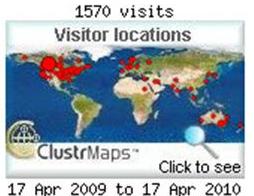
On April 17th our blog visitor ClusterMap was archived and a new visitor map was created. ClusterMap archives the map automatically after one year. Hard to believe this blog is already one year old! In the first year of Camilla School’s technology blog, we have hosted over 1500 visitors from around the globe. It is interesting to notice that we have had visitors from almost every continent. Ms. Tonhauser
Welcome to our school blog! Camilla School is a K-9 school located in the Hamlet of Riviere Qui Barre, Alberta, Canada (Sturgeon School Division).
Our "Catch the Dream...Build the Future" school motto recognizes our commitment to engaging and educating students in the 21st century.



 Posts
Posts


